
Desplegament amb vagarant
Per què triar Vagrant
Eina / Mètode
Només VirtualBox/VMware manual
Què fa
Crear i configurar VMs a mà
Avantatges
Control total
Problemes per a aquest repte
Molt temps, no reproducible, cada persona ho fa diferent
Per què NO l’he triat
No és portable ni repetible
Eina / Mètode
Docker
Què fa
Contenidors lleugers
Avantatges
Molt ràpid i lleuger
Problemes per a aquest repte
No és una màquina completa → no puc provar diferents SO ni instal·lar serveis que necessitin un kernel diferent
Per què NO l’he triat
No cobreix el 100 % dels casos del repte
Eina / Mètode
Ansible (només configuració)
Què fa
Configura màquines ja existents
Avantatges
Excel·lent per configuració
Problemes per a aquest repte
No crea ni gestiona les VMs, he de fer-ho a mà abans
Per què NO l’he triat
Solució a mitges
Eina / Mètode
Vagrant
Què fa
Crea i configura VMs automàticament
Avantatges
→ Un sol fitxer (Vagrantfile) → Funciona igual a Windows, Mac i Linux → vagrant up i ja està → Pots usar VirtualBox, VMware, Hyper-V o fins i tot
Problemes per a aquest repte
Cap desavantatge important per aquest ús
Per què NO l’he triat
És la millor opció
Motius concrets pels quals Vagrant és la millor elecció aquí
- Portabilitat total – Tothom de l’equip (o el professor) només ha de fer vagrant up i té exactament el mateix entorn, independentment del seu sistema operatiu.
- Reproduïbilitat 100 % – Tot queda escrit en un sol fitxer Vagrantfile (box, memòria, ports, carpetes compartides, provisioning amb shell/Ansible/Puppet…).
- Facilitat extrema – En 10-15 línies de codi tinc una VM amb Ubuntu 24.04, 2 GB RAM, port 8080 redirigit, carpeta del projecte sincronitzada i paquets instal·lats automàticament..
Desplegament Vagrant
Estructura de carpetes:

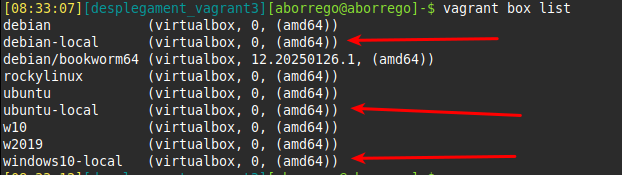
Dins de la carpeta desplegament_vagrant2 hi ha un Vagrantfile, configurat amb les boxes que necessitem:
# -*- mode: ruby -*-
# vi: set ft=ruby :

Vagrant.configure("2") do |config|

  # ═══════════════════════════════════════════════════════════
  #  Windows 10
  # ═══════════════════════════════════════════════════════════
  config.vm.define "win10" do |win|
    win.vm.box = "windows10-local"
    win.vm.hostname = "win10-local"

    # Bridge: tria tu la interfície de xarxa (Wi-Fi o cable)
    win.vm.network "public_network", bridge: "enp3s0"  # Linux
    # win.vm.network "public_network", bridge: "Wi-Fi"        # Windows (nom exacte de la teva targeta)
    # win.vm.network "public_network", bridge: "en0: Wi-Fi"   # macOS (normalment en0 o en1)

    win.vm.provider "virtualbox" do |vb|
      vb.name = "Windows10-Local-Bridge"
      vb.memory = 8192      # 8 GB RAM (ajusta si cal)
      vb.cpus = 4
      vb.gui = true         # posa false si la vols headless
      vb.customize ["modifyvm", :id, "--vram", "128"]
      vb.customize ["modifyvm", :id, "--clipboard", "bidirectional"]
      vb.customize ["modifyvm", :id, "--draganddrop", "bidirectional"]
    end
  end

  # ═══════════════════════════════════════════════════════════
  #  Ubuntu
  # ═══════════════════════════════════════════════════════════
  config.vm.define "ubuntu", primary: true do |ub|
    ub.vm.box = "ubuntu-local"
    ub.vm.hostname = "ubuntu-local"

    ub.vm.network "public_network", bridge: "enp3s0"  # canvia pel teu adaptador

    ub.vm.provider "virtualbox" do |vb|
      vb.name = "Ubuntu-Local-Bridge"
      vb.memory = 4096
      vb.cpus = 2
      vb.gui = true
    end
  end

  # ═══════════════════════════════════════════════════════════
  #  Debian
  # ═══════════════════════════════════════════════════════════
  config.vm.define "debian" do |deb|
    deb.vm.box = "debian-local"
    deb.vm.hostname = "debian-local"

    deb.vm.network "public_network", bridge: "enp3s0"  # canvia pel teu adaptador

    deb.vm.provider "virtualbox" do |vb|
      vb.name = "Debian-Local-Bridge"
      vb.memory = 2048
      vb.cpus = 2
      vb.gui = true
    end
  end

end
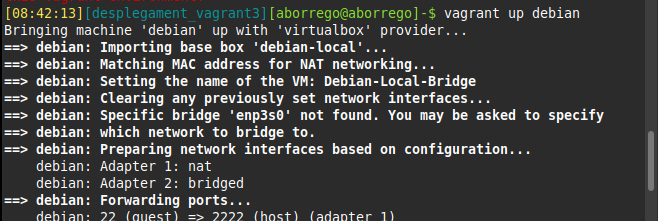
Si fem vagrant up “nom_box” la màquina es crea.

 Catalan
  English